


Distractions are an enemy I have to fight constantly. Once I get into a project I enjoy, I hyper-focus and it is hard to get me to break out of it, but sometimes I get distracted before I can even start. One moment I am “just going on youtube to watch a video” and an hour later I am on a totally different video or even on a totally different website, wondering how I got there.
This wastes precious writing time, so, in case any of you are also easily distracted like me or just short on time, I came up with some ideas that I hope will help.
While Writing:
Set up a writing schedule.
Some people do daily word count goals, I do time goals(1h/day). Whatever you choose, just use a daily goal of some kind, and give yourself a deadline that works with it. Whatever you choose, stick with it.
If you are feeling overwhelmed, however, do put a rest day or two into your schedule. Taking a break is actually good for creativity, so could help your writing during the rest of the week.
Create a Ritual.
If you are having trouble sleeping, experts often recommend doing the same thing before bed. You might read a book or have herbal tea before winding down, but the reason for this routine is simple; your brain will start associating with that routine of activities with bedtime, so that by the end of your routine, you may start feeling sleeping.
Writing is no different. Many writers go for a walk, make tea or coffee, or light the same scented candle. The goal is that if you do this, your brain will be more settled and ready to write before actually writing.
Set up time limits for apps/websites.
I actually suggested this in my writing group since it works for me, but everyone there seemed to think this idea was really scary, so it might not work for you. 😂 Using the settings on your phone or add-ons on your web browser, you can set up daily time limits for your biggest distractors. For example, I was spending too much time on Twitter. I was telling myself I was marketing (looking for posts to interact with or retweet) but really I was wasting time because I was always too socially anxious to interact anyways. Now, I am only allowed on Twitter for 30min a day.
Pomodoro Method.
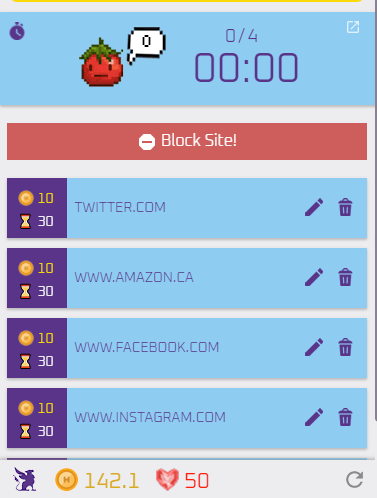
Pomodoro is a very popular time management system that has you work in timed sets and cycles. The most typical one is that you work for 25min, then you get a 5min break. You repeat this for 4 cycles, then you get a longer break. It is a way of saying that you are not ignoring the thing that distracted you, you are just putting it off until the break.
For this, I use “Habitica Pomodoro Sitekeeper“ which is a chrome plugin that works with Habitica. With it, it blocks sites of your choosing during the pomodoro’s(stopping social media distractions) then releases them during breaks. For every pomodoro you complete, it gives you points.
Forest.
This $2.00 CAD app is not one I have tried myself but is very popular. From what I understand, the more you focus on a project, the more your tree grows. However, if you get distracted (like by social media) the tree will start to die. The more projects you complete, the more trees you will get in your forest. The company even puts money towards planting real trees, so it seems like a very cool app. More info here.
4TheWords.

This one has a free trial but is not free to use after that. I believe it runs for $5/month.
4TheWords turns writing into an RPG! You fight monsters by writing, and with it, you can follow the plotline of the main quest, or work on side-quests. It has all the RPG classic staples, such as an avatar and house to customize.
Some of the quests are based on writing streaks, which is a great way to motivate you to write each day.
Use Notes and Comments.
Most writing software (including Word, Scrivener, and Google Docs) allow you to leave notes and comments on your own work while writing. Realized you need to fix a paragraph from before? Forgot a name? Have something you need to lookup? Highlight it, leave a comment, then fix it later. This can help from disrupting your writing flow, and also will keep you from forgetting what you have to fix.
Get A Door Sign
If you are writing, consider putting a sign on your door to remind people you live with. People can be forgetful, so a sign can stop silly distractions that can wait until your next writing break.
Do note: this tip only works if you have someone to watch your kids haha.
Schedule Your Writing Time Well.
Perhaps you are writing right after you get home from the dog park so your dogs are tired(for the moment), or when your kids are at school. If you have wonderful moments of peace in your house, that could be your peak writing time.
Track Your Progress
I mentioned in the first tip to create a writing schedule, but they do not really help much unless you are also tracking your progress. You will need to know how ahead or behind you are if you want to meet your deadline.
One option that is really popular for writers are DIY writing journals (here is an example video). With these, you add dates, customize it with things that motivate you(like dragon stickers, swords, or whatever else fits your theme), and add little word count bubbles. As you meet the word counts, for the day, you fill in the bubbles.
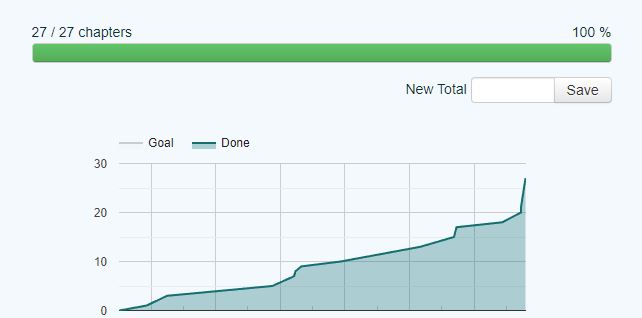
If that is not your thing, you could try MyWriteClub. This free site is still in beta, but still works and has a lot of users. The site does have the option for doing sprints with other people or alone, but I personally mostly use it for the graphs and charts.
I am a pretty visual person, so I adore that the site lets you track your writing progress this way. It also lets you choose how you are tracking (for example, by scene, chapter, word count, and so on), so you can also keep track of editing progress as well.
Misc Productivity Ideas:
Automations.
Automations can help save seconds of time. Some of these functions might be iphone-only for the moment, but be sure to research. For example:
- Writing Playlist Automations. You can have a writing playlist automatically start whenever you walk in your house(when your phone connects to your wifi) after work, or schedule it for your writing time to help you get into the mood for writing.
- App-Launch Automations. You could have your phone ask if you want to launch a writing app at a specific time.
- Text Automations. Have your phone send out a “Sorry, I am busy writing” reply to anyone who texts you during your writing time.
- Schedule Emails. Have a email that you need to send when you are supposed to be writing? Schedule it! This way you can write it ahead of time (even if it is a weird hour to be sending an email), and schedule it for a more proper time.
- Schedule a “Do Not Disturb” time. If you write at the same time every day, set this up so you eliminate unnecessary distractions (like notifications) while you write
- Utilize Smart-Tech. If you are one of those techy people with smart everything, you can have your automations turn on the lights for you in the morning, start your coffee, change the thermostat, and more. Seriously, you people are living in the future compared to me.
- Have your phone give you a morning briefing. To keep from getting tempted to immediately login to your phone(and possibly distracting you), instead you can have your phone tell you todays weather and news right when you wake up. This one is activated when you turn off your alarm.
“Pocket” or “Email This“.
Pocket(app and browser add-on) is like an online catalog just for you. You can save articles, tweets, videos, and more. Email This (browser add-on) can email articles to yourself with just a click of a button. So, let’s say you found a super cool article you want to read but is almost your writing time, then you can use one of these services to save it for later.
Try a To-do List/Habit App.
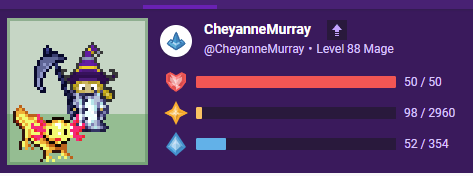
There are apps like Habitica that make your to-do list into a game, or apps like Shineday that just have a clean design. I suggest looking up a few different popular apps to see if any work for you. If they can motivate you to power through your to-do list faster, that could lead to more writing time. Also, if you think of something you need to do but you are writing at that moment, throw it into your to-do list so you don’t forget, then keep writing.
My News
I am in the midst of the finishing touches on To Steal From a King, so I am not doing NaNoWriMo this year but wish everyone who is good luck!

My Writing Progress
To Steal from a King

Final Edits/ Polishing
WOAD

Outline Rework





Leave a Reply